Building a Language Server in Go
Building a working language server in Go with go-lsp
What is this?
I’ve been working on a Go library called go-lsp that handles the grunt work of building a Language Server Protocol server. The LSP spec is one of those things that sounds straightforward until you actually try to implement it — there’s JSON-RPC framing, capability negotiation, a mountain of type definitions, and a lot of boilerplate that’s the same every time.
The library takes care of all of that so you can focus on the interesting bit: your language logic.
In this post I’m going to walk through building a working language server from scratch. It’ll track open documents, flag TODOs as warnings on save, and provide hover information. The whole thing comes in at around 80 lines.
Getting started
Grab the library:
1
go get github.com/owenrumney/go-lsp@latest
How it works
The core idea is interface-based. You create a handler struct and implement interfaces for the features you want. The server detects what you’ve implemented and handles registration and capability advertisement automatically.
The only thing you must implement is LifecycleHandler:
1
2
3
4
type LifecycleHandler interface {
    Initialize(ctx context.Context, params *lsp.InitializeParams) (*lsp.InitializeResult, error)
    Shutdown(ctx context.Context) error
}
Everything else is opt-in. Want hover? Implement HoverHandler. Want completions? Implement CompletionHandler. The server figures out the rest.
The handler
Lets start with the handler struct. We need to keep track of open documents and have a reference to the server’s client so we can push diagnostics back to the editor.
1
2
3
4
5
6
7
8
type handler struct {
    documents map[lsp.DocumentURI]string
    client    *server.Client
}

func newHandler() *handler {
    return &handler{documents: make(map[lsp.DocumentURI]string)}
}
The ClientHandler interface gives us the client reference after the connection is established:
1
2
3
func (h *handler) SetClient(client *server.Client) {
    h.client = client
}
Lifecycle
Every server needs to handle initialize and shutdown. In Initialize we tell the client what sync mode we want — in this case full document sync with save events that include the text content.
1
2
3
4
5
6
7
8
9
10
11
12
13
14
15
16
func (h *handler) Initialize(_ context.Context, _ *lsp.InitializeParams) (*lsp.InitializeResult, error) {
    return &lsp.InitializeResult{
        Capabilities: lsp.ServerCapabilities{
            TextDocumentSync: &lsp.TextDocumentSyncOptions{
                OpenClose: boolPtr(true),
                Change:    lsp.SyncFull,
                Save:      &lsp.SaveOptions{IncludeText: boolPtr(true)},
            },
        },
        ServerInfo: &lsp.ServerInfo{Name: "todo-lsp", Version: "0.1.0"},
    }, nil
}

func (h *handler) Shutdown(_ context.Context) error { return nil }

func boolPtr(b bool) *bool { return &b }
Tracking documents
Implementing TextDocumentSyncHandler gets us notified when files are opened, changed, and closed. We’re using full sync mode so each change event gives us the complete file content.
1
2
3
4
5
6
7
8
9
10
11
12
13
14
15
16
func (h *handler) DidOpen(_ context.Context, params *lsp.DidOpenTextDocumentParams) error {
    h.documents[params.TextDocument.URI] = params.TextDocument.Text
    return nil
}

func (h *handler) DidChange(_ context.Context, params *lsp.DidChangeTextDocumentParams) error {
    if len(params.ContentChanges) > 0 {
        h.documents[params.TextDocument.URI] = params.ContentChanges[len(params.ContentChanges)-1].Text
    }
    return nil
}

func (h *handler) DidClose(_ context.Context, params *lsp.DidCloseTextDocumentParams) error {
    delete(h.documents, params.TextDocument.URI)
    return nil
}
Diagnostics on save
This is where it gets interesting. When a file is saved, we scan it for TODO comments and push them back to the editor as warnings. The Client.PublishDiagnostics method handles the server-to-client notification.
1
2
3
4
5
6
7
8
9
10
11
12
13
14
15
16
17
18
19
20
21
22
23
24
25
func (h *handler) DidSave(ctx context.Context, params *lsp.DidSaveTextDocumentParams) error {
    var diags []lsp.Diagnostic

    if params.Text != nil {
        for i, line := range strings.Split(*params.Text, "\n") {
            if idx := strings.Index(line, "TODO"); idx >= 0 {
                sev := lsp.SeverityWarning
                diags = append(diags, lsp.Diagnostic{
                    Range: lsp.Range{
                        Start: lsp.Position{Line: i, Character: idx},
                        End:   lsp.Position{Line: i, Character: idx + 4},
                    },
                    Severity: &sev,
                    Source:   "todo-lsp",
                    Message:  "TODO found",
                })
            }
        }
    }

    return h.client.PublishDiagnostics(ctx, &lsp.PublishDiagnosticsParams{
        URI:         params.TextDocument.URI,
        Diagnostics: diags,
    })
}
Hover
Adding hover is just another interface. We’ll show the line content when someone hovers:
1
2
3
4
5
6
7
8
9
10
11
12
13
14
15
16
17
18
func (h *handler) Hover(_ context.Context, params *lsp.HoverParams) (*lsp.Hover, error) {
    content, ok := h.documents[params.TextDocument.URI]
    if !ok {
        return nil, nil
    }

    lines := strings.Split(content, "\n")
    if params.Position.Line >= len(lines) {
        return nil, nil
    }

    return &lsp.Hover{
        Contents: lsp.MarkupContent{
            Kind:  lsp.Markdown,
            Value: fmt.Sprintf("**Line %d**\n\n```\n%s\n```", params.Position.Line+1, lines[params.Position.Line]),
        },
    }, nil
}
Wiring it up
The main function is about as simple as it gets:
1
2
3
4
5
6
7
func main() {
    h := newHandler()
    srv := server.NewServer(h)
    if err := srv.Run(context.Background(), server.RunStdio()); err != nil {
        log.Fatal(err)
    }
}
Build it and point your editor at the binary. For Neovim:
1
2
3
4
vim.lsp.start({
    name = "todo-lsp",
    cmd = { "./todo-lsp" },
})
A couple of extras
Logging
The server supports log/slog for structured logging. Handy when you’re trying to figure out why your handler isn’t being called:
1
2
logger := slog.New(slog.NewTextHandler(os.Stderr, &slog.HandlerOptions{Level: slog.LevelDebug}))
srv := server.NewServer(h, server.WithLogger(logger))
This logs method dispatch with timing, errors, and lifecycle events. No logger set means no logging overhead.
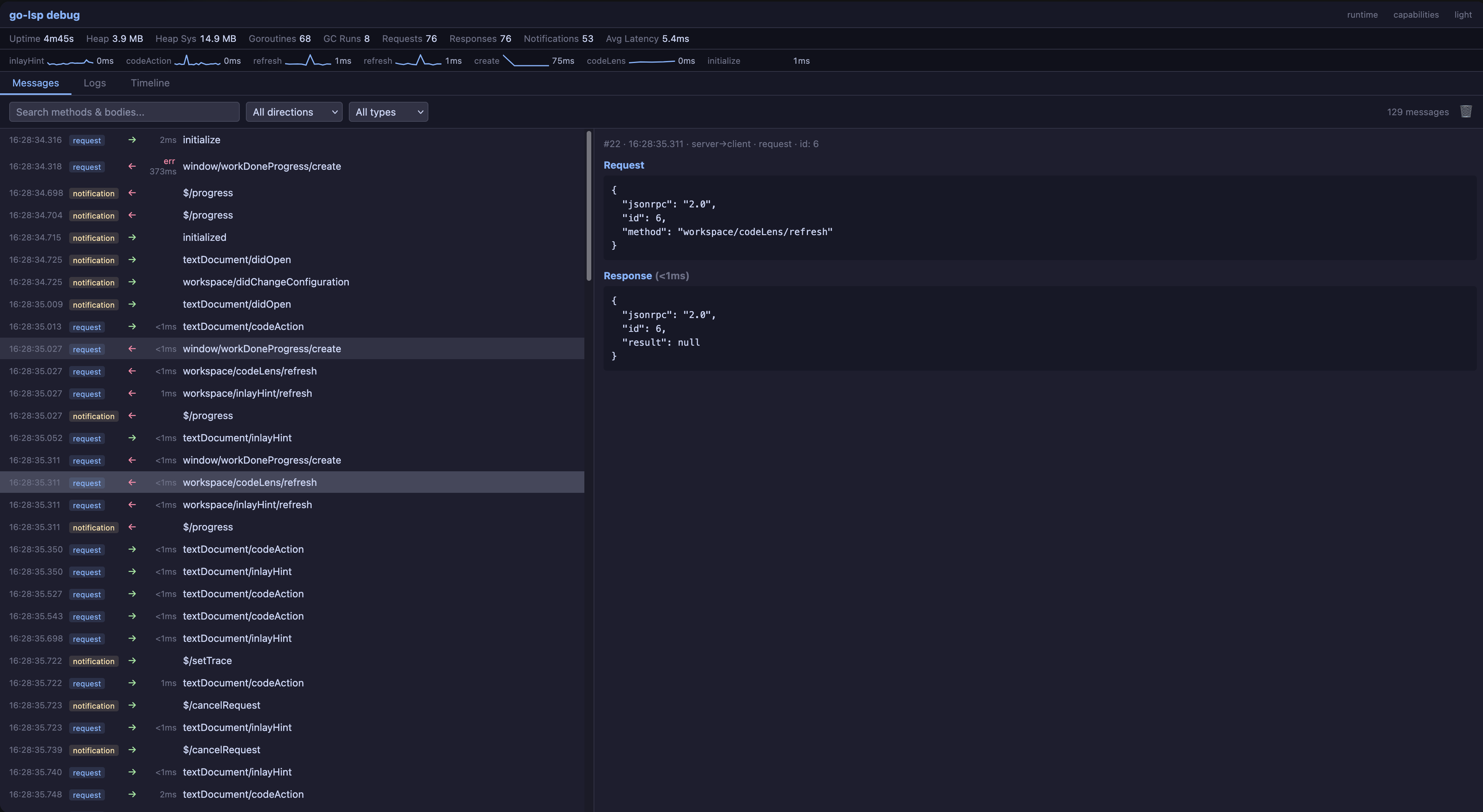
Debug UI
There’s also a built-in web UI for watching LSP traffic in real time:
1
srv := server.NewServer(h, server.WithDebugUI(":7100"))
Open http://localhost:7100 and you get a full view of every JSON-RPC message flowing between your editor and server, with timing, filtering, and a timeline view. Really useful when you’re debugging capability negotiation or trying to understand what your editor is actually sending.
Adding more features
The pattern is always the same — implement an interface, the server handles registration. Some of the more commonly used ones:
| What you want | Interface to implement |
|---|---|
| Go to definition | DefinitionHandler |
| Find references | ReferencesHandler |
| Code actions | CodeActionHandler |
| Completions | CompletionHandler |
| Formatting | DocumentFormattingHandler |
| Rename | RenameHandler |
The full list of interfaces is in server/handlers.go.
Wrap up
That’s a working language server in about 80 lines of Go. The LSP spec is massive but you don’t need to care about most of it to get something useful running. Start with the features your language actually needs and add more as you go.
The library covers the full LSP 3.17 spec, so when you need something like semantic tokens or call hierarchies, the interfaces are there waiting.
Check out the repo and the getting started guide for more detail.